最近のコンテナや仮想化環境でのデータベースの冗長化について、Patroni + etcdという構成が多いようだという事で早速勉強してみました!
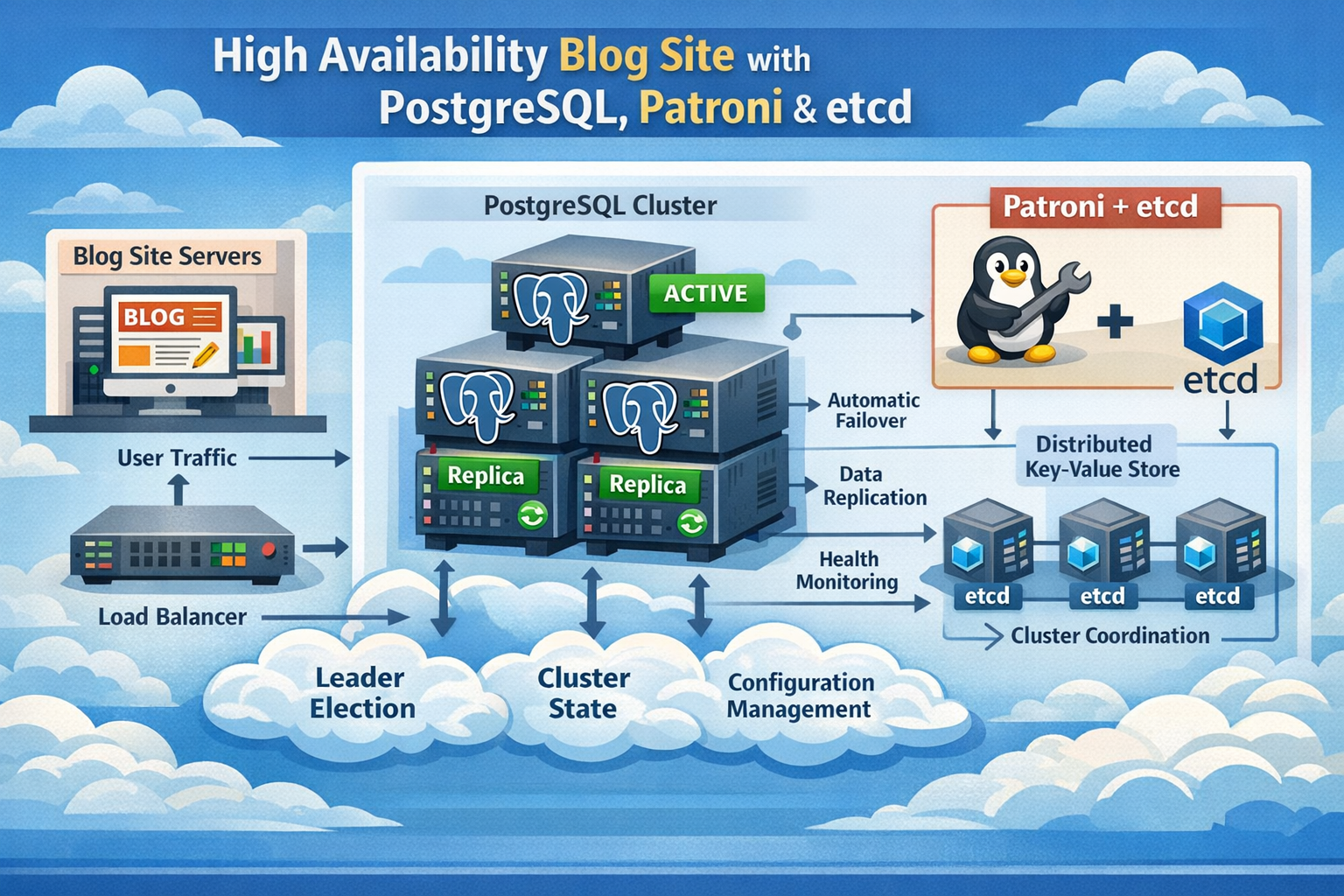
イメージは以下のような構成です。
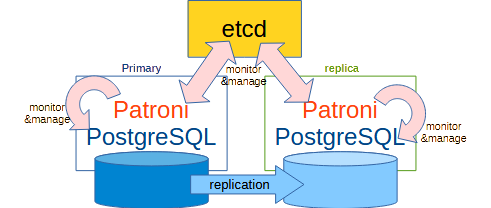
etcdではSSOT(Single Source of Truth)という事で、今回は1つしか起動していませんが、本来であれば複数(奇数)起動しておき、多数決(Quorum)でプライマリを監視・管理するべきですが、今回は Patroni+PostgreSQLの動作の勉強という事でご容赦下さいませ。
今回のディレクトリツリーは以下の通りです。
.
 |-- Dockerfile.patroni
 |-- docker-compose.yml
 |-- etcd-data
 |-- node1-data
 |-- node2-data
 `-- patroni
     |-- node1.yml
`-- node2.ymlPatroni+PostgreSQLの作成
Patroni他パッケージ入りPostgreSQLイメージを作成
Dockerfile.patroni
FROM postgres:16

USER root

RUN apt-get update -y && \
    apt-get install -y python3 python3-venv python3-pip jq && \
    rm -rf /var/lib/apt/lists/*

RUN python3 -m venv /opt/patroni-venv

RUN /opt/patroni-venv/bin/pip install --upgrade pip && \
    /opt/patroni-venv/bin/pip install "patroni[etcd]" psycopg2-binary

ENV PATH="/opt/patroni-venv/bin:$PATH"

RUN mkdir -p /var/lib/postgresql/data && \
    chown -R postgres:postgres /var/lib/postgresql

USER postgres

CMD ["bash"]ビルドする
$ sudo docker build -f Dockerfile.patroni -t patroni-pg:16 .

$ sudo docker images | grep patroni-pg
WARNING: This output is designed for human readability. For machine-readable output, please use --format.
patroni-pg:16 a35649c86e35 873MB 0BPatroniの設定を作成する
以下は、起動後に読み込まれるPatroniの設定ファイルとなります。今回はnode1, node2の2つのPostgreSQLでHAを構成します。
node1用の設定
./patoroni/node1.yml
scope: demo-cluster
name: node1

restapi:
  listen: 0.0.0.0:8008
  connect_address: node1:8008

etcd:
  host: etcd:2379

bootstrap:
  dcs:
    ttl: 30
    loop_wait: 10
    retry_timeout: 10
    maximum_lag_on_failover: 1048576
    postgresql:
      use_pg_rewind: true
      parameters:
        wal_level: replica
        hot_standby: on
        max_wal_senders: 10
        max_replication_slots: 10
    initdb:
      - encoding: UTF8
      - data-checksums
    users:
      postgres:
        password: admin@pass
        options:
          - superuser
          - createdb
      replicator:
        password: replica@pass
        options:
          - replication

postgresql:
  listen: 0.0.0.0:5432
  connect_address: node1:5432
  data_dir: /var/lib/postgresql/data
  authentication:
    superuser:
      username: postgres
      password: admin@pass
    replication:
      username: replicator
      password: replica@pass
  parameters:
    shared_buffers: 256MB
    max_connections: 100
  pg_hba:
    - local all all trust
    - host all all 0.0.0.0/0 md5
    - host replication replicator 0.0.0.0/0 md5

tags:
  nofailover: false
  noloadbalance: false
clonefrom: falsenode2の設定
./patroni/node2.yml
scope: demo-cluster
name: node2

restapi:
  listen: 0.0.0.0:8008
  connect_address: node2:8008

etcd:
  host: etcd:2379

bootstrap:
  dcs:
    ttl: 30
    loop_wait: 10
    retry_timeout: 10
    maximum_lag_on_failover: 1048576
    postgresql:
      use_pg_rewind: true
      parameters:
        wal_level: replica
        hot_standby: on
        max_wal_senders: 10
        max_replication_slots: 10
    initdb:
      - encoding: UTF8
      - data-checksums
    users:
      postgres:
        password: admin@pass
        options:
          - superuser
          - createdb
      replicator:
        password: replica@pass
        options:
          - replication

postgresql:
  listen: 0.0.0.0:5432
  connect_address: node1:5432
  data_dir: /var/lib/postgresql/data
  authentication:
    superuser:
      username: postgres
      password: admin@pass
    replication:
      username: replicator
      password: replica@pass
  parameters:
    shared_buffers: 256MB
    max_connections: 100
  pg_hba:
    - local all all trust
    - host all all 0.0.0.0/0 md5
    - host replication replicator 0.0.0.0/0 md5

tags:
  nofailover: false
  noloadbalance: false
clonefrom: falsedocker-composeの作成
./docker-compose.yml
services:
  etcd:
    image: quay.io/coreos/etcd:v3.5.11
    container_name: etcd
    command:
      - /usr/local/bin/etcd
      - --name=etcd0
      - --data-dir=/etcd-data
      - --listen-client-urls=http://0.0.0.0:2379
      - --advertise-client-urls=http://etcd:2379
      - --listen-peer-urls=http://0.0.0.0:2380
      - --initial-advertise-peer-urls=http://etcd:2380
      - --initial-cluster=etcd0=http://etcd:2380
      - --initial-cluster-state=new
      - --enable-v2=true
    volumes:
      - ./etcd-data:/etcd-data
    ports:
      - "2379:2379"
    networks:
      - patroni-net
    restart: unless-stopped

  node1:
    image: patroni-pg:16
    container_name: patroni-node1
    depends_on:
      - etcd
    user: "postgres"
    environment:
      PATRONI_LOG_LEVEL: INFO
    volumes:
      - ./node1-data:/var/lib/postgresql/data
      - ./patroni/node1.yml:/etc/patroni.yml
    command: ["patroni", "/etc/patroni.yml"]
    ports:
      - "5432:5432"   # node1 PostgreSQL
      - "8008:8008"   # Patroni REST for node1
    networks:
      - patroni-net
    restart: unless-stopped

  node2:
    image: patroni-pg:16
    container_name: patroni-node2
    depends_on:
      - etcd
    user: "postgres"
    environment:
      PATRONI_LOG_LEVEL: INFO
    volumes:
      - ./node2-data:/var/lib/postgresql/data
      - ./patroni/node2.yml:/etc/patroni.yml
    command: ["patroni", "/etc/patroni.yml"]
    ports:
      - "5433:5432"   # node2 PostgreSQL
      - "8009:8008"   # Patroni REST for node2
    networks:
      - patroni-net
    restart: unless-stopped

networks:
  patroni-net:
driver: bridgeパーミション設定
% sudo chmod 700 ./node1-data ./node2-data ./etcd-data
% sudo chown -R 999:999 ./node1-data ./node2-data起動
まずはじめにetcdだけ起動する。多分imageをまだ取得していないので時間がかかるので。
% sudo docker-compose up -d etcd
Creating network "pg-patroni-ha_patroni-net" with driver "bridge"
Pulling etcd (quay.io/coreos/etcd:v3.5.11)...
v3.5.11: Pulling from coreos/etcd
63b450eae87c: Pull complete
960043b8858c: Pull complete
b4ca4c215f48: Pull complete
eebb06941f3e: Pull complete
02cd68c0cbf6: Pull complete
d3c894b5b2b0: Pull complete
b40161cd83fc: Pull complete
46ba3f23f1d3: Pull complete
4fa131a1b726: Pull complete
2dee0c551ea9: Pull complete
14b7aea02afd: Pull complete
2670ef230b3a: Pull complete
18b2a73de8d9: Pull complete
9c0f3e2fb65e: Pull complete
Digest: sha256:8429758911821e<snip>97af0b3d119c74921f5fb6f19
Status: Downloaded newer image for quay.io/coreos/etcd:v3.5.11
Creating etcd ... done

$ sudo docker logs etcd※エラーが無いかポート番号がちゃんとリッスンできているかなどを確認
次に、ndoe1,2を起動します
% sudo docker-compose up -d node1 node2※ちなみにですが、docker-composeからはnode1, node2 としてアクセスできますが、dockerからは、patroni-node1, patroni-node2としてアクセスすることになりますのでご注意
動作確認
node1の起動ログを確認
% sudo docker logs -f patroni-node1
2026-01-10 04:24:23,321 INFO: No PostgreSQL configuration items changed, nothing to reload.
2026-01-10 04:24:23,350 INFO: Systemd integration is not supported
2026-01-10 04:24:23,360 INFO: Lock owner: None; I am node1
2026-01-10 04:24:23,363 INFO: waiting for leader to bootstrapnode2の起動とそのログ
$ sudo docker logs -f patroni-node2
2026-01-10 05:03:17,654 INFO: No PostgreSQL configuration items changed, nothing to reload.
2026-01-10 05:03:17,678 INFO: Systemd integration is not supported
2026-01-10 05:03:17,682 WARNING: Postgresql is not running.
2026-01-10 05:03:17,682 INFO: Lock owner: node1; I am node2
2026-01-10 05:03:17,684 INFO: pg_controldata:
  pg_control version number: 1300
  Catalog version number: 202307071
  Database system identifier: 7593529639153778709
  Database cluster state: shut down in recovery
  pg_control last modified: Sat Jan 10 05:03:03 2026
  Latest checkpoint location: 0/3000228
  Latest checkpoint's REDO location: 0/30001F0
  Latest checkpoint's REDO WAL file: 000000070000000000000003
  Latest checkpoint's TimeLineID: 7
  Latest checkpoint's PrevTimeLineID: 7
  Latest checkpoint's full_page_writes: on
  Latest checkpoint's NextXID: 0:744
  Latest checkpoint's NextOID: 16389
  Latest checkpoint's NextMultiXactId: 1
  Latest checkpoint's NextMultiOffset: 0
  Latest checkpoint's oldestXID: 723
  Latest checkpoint's oldestXID's DB: 1
  Latest checkpoint's oldestActiveXID: 744
  Latest checkpoint's oldestMultiXid: 1
  Latest checkpoint's oldestMulti's DB: 1
  Latest checkpoint's oldestCommitTsXid: 0
  Latest checkpoint's newestCommitTsXid: 0
  Time of latest checkpoint: Sat Jan 10 04:31:29 2026
  Fake LSN counter for unlogged rels: 0/3E8
  Minimum recovery ending location: 0/30002D8
  Min recovery ending loc's timeline: 7
  Backup start location: 0/0
  Backup end location: 0/0
  End-of-backup record required: no
  wal_level setting: replica
  wal_log_hints setting: on
  max_connections setting: 100
  max_worker_processes setting: 8
  max_wal_senders setting: 10
  max_prepared_xacts setting: 0
  max_locks_per_xact setting: 64
  track_commit_timestamp setting: off
  Maximum data alignment: 8
  Database block size: 8192
  Blocks per segment of large relation: 131072
  WAL block size: 8192
  Bytes per WAL segment: 16777216
  Maximum length of identifiers: 64
  Maximum columns in an index: 32
  Maximum size of a TOAST chunk: 1996
  Size of a large-object chunk: 2048
  Date/time type storage: 64-bit integers
  Float8 argument passing: by value
  Data page checksum version: 0
  Mock authentication nonce: ea482b8120dd4ae<snip>c90d74394

2026-01-10 05:03:17,685 INFO: Lock owner: node1; I am node2
2026-01-10 05:03:17,694 INFO: Local timeline=7 lsn=0/30002D8
2026-01-10 05:03:17,721 INFO: primary_timeline=7
2026-01-10 05:03:17,721 INFO: Lock owner: node1; I am node2
2026-01-10 05:03:17,725 INFO: starting as a secondary
2026-01-10 05:03:18,132 INFO: postmaster pid=23
2026-01-10 05:03:18.135 UTC [23] LOG:  starting PostgreSQL 16.10 (Debian 16.10-1.pgdg13+1) on x86_64-pc-linux-gnu, compiled by gcc (Debian 14.2.0-19) 14.2.0, 64-bit
2026-01-10 05:03:18.135 UTC [23] LOG:  listening on IPv4 address "0.0.0.0", port 5432
2026-01-10 05:03:18.153 UTC [23] LOG:  listening on Unix socket "/var/run/postgresql/.s.PGSQL.5432"
2026-01-10 05:03:18.164 UTC [27] LOG:  database system was shut down in recovery at 2026-01-10 05:03:03 UTC
2026-01-10 05:03:18.164 UTC [27] LOG:  entering standby mode
2026-01-10 05:03:18.174 UTC [27] LOG:  redo starts at 0/30001F0
2026-01-10 05:03:18.174 UTC [27] LOG:  consistent recovery state reached at 0/30002D8
2026-01-10 05:03:18.174 UTC [27] LOG:  invalid record length at 0/30002D8: expected at least 24, got 0
2026-01-10 05:03:18.174 UTC [23] LOG:  database system is ready to accept read-only connections
localhost:5432 - accepting connections
2026-01-10 05:03:18.201 UTC [28] LOG:  started streaming WAL from primary at 0/3000000 on timeline 7
localhost:5432 - accepting connections
2026-01-10 05:03:18,233 INFO: Lock owner: node1; I am node2
2026-01-10 05:03:18,233 INFO: establishing a new patroni heartbeat connection to postgres
2026-01-10 05:03:18,260 INFO: no action. I am (node2), a secondary, and following a leader (node1)
2026-01-10 05:03:20,285 INFO: no action. I am (node2), a secondary, and following a leader (node1)patroniの動作確認
// node1

$ curl http://localhost:8008/ | jq
{
  "state": "running",
  "postmaster_start_time": "2026-01-10 04:31:29.119878+00:00",
  "role": "primary",
  "server_version": 160010,
  "xlog": {
    "location": 50332376
  },
  "timeline": 7,
  "replication": [
    {
      "usename": "replicator",
      "application_name": "node2",
      "client_addr": "172.24.0.4",
      "state": "streaming",
      "sync_state": "async",
      "sync_priority": 0
    }
  ],
  "dcs_last_seen": 1768020910,
  "database_system_identifier": "7593529639153778709",
  "patroni": {
    "version": "4.1.0",
    "scope": "demo-cluster",
    "name": "node1"
  }
}


// node2

$ curl http://localhost:8009/ | jq
{
  "state": "running",
  "postmaster_start_time": "2026-01-10 04:54:46.642707+00:00",
  "role": "replica",
  "server_version": 160010,
  "xlog": {
    "received_location": 50332376,
    "replayed_location": 50332376,
    "replayed_timestamp": null,
    "paused": false
  },
  "timeline": 7,
  "replication_state": "streaming",
  "dcs_last_seen": 1768020920,
  "database_system_identifier": "7593529639153778709",
  "patroni": {
    "version": "4.1.0",
    "scope": "demo-cluster",
    "name": "node2"
  }
}※node1が role:primaryで、node2が role:replica になっていることを確認する
PostgreSQLがreplicaされているか確認する。
node2には何も無い事を確認する。
$ sudo docker exec -it patroni-node2 psql -U postgres -d postgres
psql (16.10 (Debian 16.10-1.pgdg13+1))
Type "help" for help.

postgres=# \d
Did not find any relations.node1にもまだ何も無い事を確認してテーブルを作成する。
$ sudo docker exec -it patroni-node1 psql -U postgres -d postgres
psql (16.10 (Debian 16.10-1.pgdg13+1))
Type "help" for help.

postgres=# \d
Did not find any relations.

postgres=# CREATE TABLE employees (
postgres(# id SERIAL PRIMARY KEY,
postgres(# name TEXT NOT NULL,
postgres(# role TEXT NOT NULL,
postgres(# salary NUMERIC(10,2)
postgres(# );
CREATE TABLE

postgres=# INSERT INTO employees (name, role, salary) VALUES
('saka', 'DBA', 100.00),
('yoko', 'Developer', 200.00);
INSERT 0 2node2にレプリケーションされていることを確認する。
$ sudo  docker exec -it patroni-node2 psql -U postgres -d postgres
psql (16.10 (Debian 16.10-1.pgdg13+1))
Type "help" for help.

postgres=# \d
                List of relations
 Schema |       Name       |   Type   |  Owner
--------+------------------+----------+----------
 public | employees        | table    | postgres
 public | employees_id_seq | sequence | postgres
(2 rows)

postgres=# SELECT * FROM employees;
 id | name |   role    | salary
----+------+-----------+--------
  1 | saka | DBA       | 100.00
  2 | yoko | Developer | 200.00
(2 rows)リカバリ状態を確認する
postgres=# SELECT pg_is_in_recovery();
 pg_is_in_recovery
-------------------
 t
(1 row)※tは、trueの意味。読み取り専用
FailOver/FailBackの確認
FailOver
異常の発生と切替り
node1を停止したのち、node2が現用になっていることを確認する。
$ sudo docker stop patroni-node1 ; sudo docker logs -f patroni-node2
patroni-node1
2026-01-10 05:03:17,654 INFO: No PostgreSQL configuration items changed, nothing to reload.
2026-01-10 05:03:17,678 INFO: Systemd integration is not supported
2026-01-10 05:03:17,682 WARNING: Postgresql is not running.
2026-01-10 05:03:17,682 INFO: Lock owner: node1; I am node2
2026-01-10 05:03:17,684 INFO: pg_controldata:
  pg_control version number: 1300
  Catalog version number: 202307071
  Database system identifier: 7593529639153778709
  Database cluster state: shut down in recovery
  pg_control last modified: Sat Jan 10 05:03:03 2026
  Latest checkpoint location: 0/3000228
  Latest checkpoint's REDO location: 0/30001F0
  Latest checkpoint's REDO WAL file: 000000070000000000000003
  Latest checkpoint's TimeLineID: 7
  Latest checkpoint's PrevTimeLineID: 7
  Latest checkpoint's full_page_writes: on
  Latest checkpoint's NextXID: 0:744
  Latest checkpoint's NextOID: 16389
  Latest checkpoint's NextMultiXactId: 1
  Latest checkpoint's NextMultiOffset: 0
  Latest checkpoint's oldestXID: 723
  Latest checkpoint's oldestXID's DB: 1
  Latest checkpoint's oldestActiveXID: 744
  Latest checkpoint's oldestMultiXid: 1
  Latest checkpoint's oldestMulti's DB: 1
  Latest checkpoint's oldestCommitTsXid: 0
  Latest checkpoint's newestCommitTsXid: 0
  Time of latest checkpoint: Sat Jan 10 04:31:29 2026
  Fake LSN counter for unlogged rels: 0/3E8
  Minimum recovery ending location: 0/30002D8
  Min recovery ending loc's timeline: 7
  Backup start location: 0/0
  Backup end location: 0/0
  End-of-backup record required: no
  wal_level setting: replica
  wal_log_hints setting: on
  max_connections setting: 100
  max_worker_processes setting: 8
  max_wal_senders setting: 10
  max_prepared_xacts setting: 0
  max_locks_per_xact setting: 64
  track_commit_timestamp setting: off
  Maximum data alignment: 8
  Database block size: 8192
  Blocks per segment of large relation: 131072
  WAL block size: 8192
  Bytes per WAL segment: 16777216
  Maximum length of identifiers: 64
  Maximum columns in an index: 32
  Maximum size of a TOAST chunk: 1996
  Size of a large-object chunk: 2048
  Date/time type storage: 64-bit integers
  Float8 argument passing: by value
  Data page checksum version: 0
  Mock authentication nonce: ea482b8120dd4<snip>cf1c90d74394

2026-01-10 05:03:17,685 INFO: Lock owner: node1; I am node2
2026-01-10 05:03:17,694 INFO: Local timeline=7 lsn=0/30002D8
2026-01-10 05:03:17,721 INFO: primary_timeline=7
2026-01-10 05:03:17,721 INFO: Lock owner: node1; I am node2
2026-01-10 05:03:17,725 INFO: starting as a secondary
2026-01-10 05:03:18,132 INFO: postmaster pid=23
2026-01-10 05:03:18.135 UTC [23] LOG:  starting PostgreSQL 16.10 (Debian 16.10-1.pgdg13+1) on x86_64-pc-linux-gnu, compiled by gcc (Debian 14.2.0-19) 14.2.0, 64-bit
2026-01-10 05:03:18.135 UTC [23] LOG:  listening on IPv4 address "0.0.0.0", port 5432
2026-01-10 05:03:18.153 UTC [23] LOG:  listening on Unix socket "/var/run/postgresql/.s.PGSQL.5432"
2026-01-10 05:03:18.164 UTC [27] LOG:  database system was shut down in recovery at 2026-01-10 05:03:03 UTC
2026-01-10 05:03:18.164 UTC [27] LOG:  entering standby mode
2026-01-10 05:03:18.174 UTC [27] LOG:  redo starts at 0/30001F0
2026-01-10 05:03:18.174 UTC [27] LOG:  consistent recovery state reached at 0/30002D8
2026-01-10 05:03:18.174 UTC [27] LOG:  invalid record length at 0/30002D8: expected at least 24, got 0
2026-01-10 05:03:18.174 UTC [23] LOG:  database system is ready to accept read-only connections
localhost:5432 - accepting connections
2026-01-10 05:03:18.201 UTC [28] LOG:  started streaming WAL from primary at 0/3000000 on timeline 7
localhost:5432 - accepting connections
2026-01-10 05:03:18,233 INFO: Lock owner: node1; I am node2
2026-01-10 05:03:18,233 INFO: establishing a new patroni heartbeat connection to postgres
2026-01-10 05:03:18,260 INFO: no action. I am (node2), a secondary, and following a leader (node1)
2026-01-10 05:03:20,285 INFO: no action. I am (node2), a secondary, and following a leader (node1)
   :
   :
2026-01-10 05:21:37,231 INFO: no action. I am (node2), the leader with the lock※ node2がnode1のsecondary から leaderに昇格しています
node2にデータが投入できるか確認する。
postgres=# SELECT pg_is_in_recovery();
 pg_is_in_recovery
-------------------
 f
(1 row)

postgres=# INSERT INTO employees(name, role, salary) VALUES('nanasi', 'DevOps', 500.00);
INSERT 0 1

postgres=# SELECT * FROM employees;
 id |  name  |   role    | salary
----+--------+-----------+--------
  1 | saka   | DBA       | 100.00
  2 | yoko   | Developer | 200.00
 34 | nanasi | DevOps    | 500.00
(3 rows)
異常の復旧と確認
node1を復旧させてみます。復旧後はnode1がreplicaでnode2がprimaryとなっていることを確認します。
$ sudo docker start patroni-node1
patroni-node1

$ curl http://localhost:8008/ | jq
{
  "state": "running",
  "postmaster_start_time": "2026-01-10 05:53:07.375152+00:00",
  "role": "replica",
  "server_version": 160010,
  "xlog": {
    "received_location": 50579312,
    "replayed_location": 50579312,
    "replayed_timestamp": "2026-01-10 05:30:39.238103+00:00",
    "paused": false
  },
  "timeline": 8,
  "replication_state": "streaming",
  "dcs_last_seen": 1768024407,
  "database_system_identifier": "7593529639153778709",
  "patroni": {
    "version": "4.1.0",
    "scope": "demo-cluster",
    "name": "node1"
  }
}

$ curl http://localhost:8009/ | jq
{
  "state": "running",
  "postmaster_start_time": "2026-01-10 05:03:18.158145+00:00",
  "role": "primary",
  "server_version": 160010,
  "xlog": {
    "location": 50579312
  },
  "timeline": 8,
  "replication": [
    {
      "usename": "replicator",
      "application_name": "node1",
      "client_addr": "172.24.0.3",
      "state": "streaming",
      "sync_state": "async",
      "sync_priority": 0
    }
  ],
  "dcs_last_seen": 1768024417,
  "database_system_identifier": "7593529639153778709",
  "patroni": {
    "version": "4.1.0",
    "scope": "demo-cluster",
    "name": "node2"
  }
}※ node1がreplicaで、node2がprimaryになっていることが確認できます
FailBack
今度はnode2を停止させると、node1がprimaryに戻ります。
$ sudo docker stop patroni-node2; sudo docker logs -f patroni-node1
<snip>
2026-01-10 04:24:35,763 INFO: no action. I am (node1), a secondary, and following a leader (node2)
   :
   :
2026-01-10 04:31:30,283 INFO: no action. I am (node1), the leader with the lock


$ sudo docker exec -it patroni-node1 psql -U postgres -d postgres -c 'SELECT pg_is_in_recovery();'
 pg_is_in_recovery
-------------------
 f
(1 row)

$ curl http://localhost:8008/ | jq
{
  "state": "running",
  "postmaster_start_time": "2026-01-10 05:53:07.375152+00:00",
  "role": "primary",
  "server_version": 160010,
  "xlog": {
    "location": 50579712
  },
  "timeline": 9,
  "dcs_last_seen": 1768025242,
  "database_system_identifier": "7593529639153778709",
  "patroni": {
    "version": "4.1.0",
    "scope": "demo-cluster",
    "name": "node1"
  }
}node2を起動して確認
$ sudo docker start patroni-node2
patroni-node2

$ sudo docker logs -f patroni-node2
<snip>
2026-01-10 06:09:12,393 INFO: no action. I am (node2), a secondary, and following a leader (node1)

$ curl http://localhost:8009/ | jq
{
  "state": "running",
  "postmaster_start_time": "2026-01-10 06:08:56.881990+00:00",
  "role": "replica",
  "server_version": 160010,
  "xlog": {
    "received_location": 50579712,
    "replayed_location": 50579712,
    "replayed_timestamp": null,
    "paused": false
  },
  "timeline": 9,
  "replication_state": "streaming",
  "dcs_last_seen": 1768025532,
  "database_system_identifier": "7593529639153778709",
  "patroni": {
    "version": "4.1.0",
    "scope": "demo-cluster",
    "name": "node2"
  }
}付録
コマンド(patronictl)による管理
状態の確認
$ docker exec -it patroni-node2 patronictl -c /etc/patroni.yml list
+ Cluster: demo-cluster (7593529639153778709) ------------+-----+------------+-----+
| Member | Host  | Role    | State     | TL | Receive LSN | Lag | Replay LSN | Lag |
+--------+-------+---------+-----------+----+-------------+-----+------------+-----+
| node1  | node1 | Replica | streaming | 10 |   0/303CA90 |   0 |  0/303CA90 |   0 |
| node2  | node2 | Leader  | running   | 10 |             |     |            |     |
+--------+-------+---------+-----------+----+-------------+-----+------------+-----+
切替
以下の例は、demo-clusterのクラスタのnode2がleader、node1がReplicaの状態の所を、node1をleader、node2をReplicaにするというコマンドです。
$ docker exec -it patroni-node1 patronictl -c /etc/patroni.yml switchover demo-cluster --leader node2 --candidate node1
Current cluster topology
+ Cluster: demo-cluster (7593529639153778709) ------------+-----+------------+-----+
| Member | Host  | Role    | State     | TL | Receive LSN | Lag | Replay LSN | Lag |
+--------+-------+---------+-----------+----+-------------+-----+------------+-----+
| node1  | node1 | Replica | streaming | 10 |   0/303CA90 |   0 |  0/303CA90 |   0 |
| node2  | node2 | Leader  | running   | 10 |             |     |            |     |
+--------+-------+---------+-----------+----+-------------+-----+------------+-----+
When should the switchover take place (e.g. 2026-01-12T03:16 )  [now]:
Are you sure you want to switchover cluster demo-cluster, demoting current leader node2? [y/N]: y
2026-01-12 02:16:18.34304 Successfully switched over to "node1"
+ Cluster: demo-cluster (7593529639153778709) ----------+-----+------------+-----+
| Member | Host  | Role    | State   | TL | Receive LSN | Lag | Replay LSN | Lag |
+--------+-------+---------+---------+----+-------------+-----+------------+-----+
| node1  | node1 | Leader  | running | 10 |             |     |            |     |
| node2  | node2 | Replica | stopped |    |     unknown |     |    unknown |     |
+--------+-------+---------+---------+----+-------------+-----+------------+-----+


$ docker exec -it patroni-node2 patronictl -c /etc/patroni.yml list
+ Cluster: demo-cluster (7593529639153778709) ------------+-----+------------+-----+
| Member | Host  | Role    | State     | TL | Receive LSN | Lag | Replay LSN | Lag |
+--------+-------+---------+-----------+----+-------------+-----+------------+-----+
| node1  | node1 | Leader  | running   | 11 |             |     |            |     |
| node2  | node2 | Replica | streaming | 11 |   0/303CCD0 |   0 |  0/303CCD0 |   0 |
+--------+-------+---------+-----------+----+-------------+-----+------------+-----+※ --force を付ければ確認無しに切り替わります
構成
listでは構成情報が一覧で出てきますが、topologyではLeader/Replicaの関連性がMemberの欄で表現されています。
$ docker exec -it patroni-node1 patronictl -c /etc/patroni.yml topology
+ Cluster: demo-cluster (7593529639153778709) -------------+-----+------------+-----+
| Member  | Host  | Role    | State     | TL | Receive LSN | Lag | Replay LSN | Lag |
+---------+-------+---------+-----------+----+-------------+-----+------------+-----+
| node1   | node1 | Leader  | running   | 11 |             |     |            |     |
| + node2 | node2 | Replica | streaming | 11 |   0/303CCD0 |   0 |  0/303CCD0 |   0 |
+---------+-------+---------+-----------+----+-------------+-----+------------+-----+履歴
$ docker exec -it patroni-node1 patronictl -c /etc/patroni.yml history
+----+----------+------------------------------+----------------------------------+------------+
| TL |      LSN | Reason                       | Timestamp                        | New Leader |
+----+----------+------------------------------+----------------------------------+------------+
|  1 | 22263608 | no recovery target specified | 2026-01-10T00:55:44.630139+00:00 | node2      |
|  2 | 22466080 | no recovery target specified | 2026-01-10T01:05:46.292159+00:00 | node2      |
|  3 | 22466480 | no recovery target specified | 2026-01-10T01:06:38.390087+00:00 | node2      |
|  4 | 22466880 | no recovery target specified | 2026-01-10T01:08:52.530048+00:00 | node2      |
|  5 | 22467280 | no recovery target specified | 2026-01-10T04:24:24.024385+00:00 | node2      |
|  6 | 50332096 | no recovery target specified | 2026-01-10T04:31:29.350956+00:00 | node1      |
|  7 | 50567776 | no recovery target specified | 2026-01-10T05:21:36.315349+00:00 | node2      |
|  8 | 50579432 | no recovery target specified | 2026-01-10T06:02:51.479810+00:00 | node1      |
|  9 | 50579832 | no recovery target specified | 2026-01-10T06:18:58.171629+00:00 | node2      |
| 10 | 50580408 | no recovery target specified | 2026-01-12T02:16:17.561121+00:00 | node1      |
+----+----------+------------------------------+----------------------------------+------------+ヘルプ
patronictl [OPTIONS] COMMAND [ARGS]...

  Command-line interface for interacting with Patroni.

Options:
  -c, --config-file TEXT     Configuration file
  -d, --dcs-url, --dcs TEXT  The DCS connect url
  -k, --insecure             Allow connections to SSL sites without certs
  --help                     Show this message and exit.

Commands:
  demote-cluster   Demote cluster to a standby cluster
  dsn              Generate a dsn for the provided member, defaults to a...
  edit-config      Edit cluster configuration
  failover         Failover to a replica
  flush            Discard scheduled events
  history          Show the history of failovers/switchovers
  list             List the Patroni members for a given Patroni
  pause            Disable auto failover
  promote-cluster  Promote cluster, make it run standalone
  query            Query a Patroni PostgreSQL member
  reinit           Reinitialize cluster member
  reload           Reload cluster member configuration
  remove           Remove cluster from DCS
  restart          Restart cluster member
  resume           Resume auto failover
  show-config      Show cluster configuration
  switchover       Switchover to a replica
  topology         Prints ASCII topology for given cluster
  version          Output version of patronictl command or a running...


patronictl list [OPTIONS] [CLUSTER_NAMES]...

  List the Patroni members for a given Patroni

Options:
  --group INTEGER                 Citus group
  -e, --extended                  Show some extra information
  -t, --timestamp                 Print timestamp
  -f, --format [pretty|tsv|json|yaml|yml]
                                  Output format
  -W                              Auto update the screen every 2 seconds
  -w, --watch FLOAT               Auto update the screen every X seconds
  --help                          Show this message and exit.


patronictl switchover [OPTIONS] [CLUSTER_NAME]

  Switchover to a replica

Options:
  --group INTEGER           Citus group
  --leader, --primary TEXT  The name of the current leader
  --candidate TEXT          The name of the candidate
  --scheduled TEXT          Timestamp of a scheduled switchover in unambiguous
                            format (e.g. ISO 8601)
  --force                   Do not ask for confirmation at any point
--help Show this message and exit.etcdが落ちたらどうなるの?
落ちてる間は両方がreplica状態になった。(今回の構成ではetcdは1つしかない為、スプリットブレイン=マスターの確認が出来ない状態)。データの整合性を維持するという意味ではあるべき動作と思う。
$ docker stop etcd
etcd

$ curl http://localhost:8008/ | jq
{
  "state": "running",
  "postmaster_start_time": "2026-01-10 06:18:22.938926+00:00",
  "role": "replica",
  "server_version": 160010,
  "xlog": {
    "received_location": 50579832,
    "replayed_location": 50579832,
    "replayed_timestamp": null,
    "paused": false
  },
  "timeline": 9,
  "replication": [
    {
      "usename": "replicator",
      "application_name": "node2",
      "client_addr": "172.24.0.4",
      "state": "streaming",
      "sync_state": "async",
      "sync_priority": 0
    }
  ],
  "cluster_unlocked": true,
  "dcs_last_seen": 1768025882,
  "database_system_identifier": "7593529639153778709",
  "patroni": {
    "version": "4.1.0",
    "scope": "demo-cluster",
    "name": "node1"
  }
}

$ curl http://localhost:8009/ | jq
{
  "state": "running",
  "postmaster_start_time": "2026-01-10 06:08:56.881990+00:00",
  "role": "replica",
  "server_version": 160010,
  "xlog": {
    "received_location": 50579832,
    "replayed_location": 50579832,
    "replayed_timestamp": null,
    "paused": false
  },
  "timeline": 9,
  "replication_state": "streaming",
  "cluster_unlocked": true,
  "dcs_last_seen": 1768025882,
  "database_system_identifier": "7593529639153778709",
  "patroni": {
    "version": "4.1.0",
    "scope": "demo-cluster",
    "name": "node2"
  }
}
etcdを起動したのちは、node2に切り替わって正常動作に戻った。
$ sudo docker exec -it patroni-node1 psql -U postgres -d postgres -c 'SELECT pg_is_in_recovery();'
 pg_is_in_recovery
-------------------
 t
(1 row)

$ sudo docker exec -it patroni-node2 psql -U postgres -d postgres -c 'SEL
ECT pg_is_in_recovery();'
 pg_is_in_recovery
-------------------
 f
(1 row)


$ curl http://localhost:8008/ | jq
{
  "state": "running",
  "postmaster_start_time": "2026-01-10 06:18:22.938926+00:00",
  "role": "replica",
  "server_version": 160010,
  "xlog": {
    "received_location": 50580112,
    "replayed_location": 50580112,
    "replayed_timestamp": null,
    "paused": false
  },
  "timeline": 10,
  "replication_state": "streaming",
  "dcs_last_seen": 1768026319,
  "database_system_identifier": "7593529639153778709",
  "patroni": {
    "version": "4.1.0",
    "scope": "demo-cluster",
    "name": "node1"
  }
}

$ curl http://localhost:8009/ | jq
{
  "state": "running",
  "postmaster_start_time": "2026-01-10 06:08:56.881990+00:00",
  "role": "primary",
  "server_version": 160010,
  "xlog": {
    "location": 50580112
  },
  "timeline": 10,
  "replication": [
    {
      "usename": "replicator",
      "application_name": "node1",
      "client_addr": "172.24.0.3",
      "state": "streaming",
      "sync_state": "async",
      "sync_priority": 0
    }
  ],
  "dcs_last_seen": 1768026329,
  "database_system_identifier": "7593529639153778709",
  "patroni": {
    "version": "4.1.0",
    "scope": "demo-cluster",
    "name": "node2"
  }
}
maximum_lag_on_failoverの動作について
1. 何に使われるのか
この値を読むのは Patroni の Python プロセスです。
- etcd → この値を保存
- Patroni → etcd からこの値を読み取り、フェイルオーバー時に評価
2. 何を制御しているのか
フェイルオーバー時、Patroni は各レプリカについて
「今のマスターからどれだけ WAL が遅れているか」
を pg_stat_replication と pg_last_wal_receive_lsn() などで計算します。
その差が
現在のWAL位置 - レプリカの受信済WAL位置
で計測され、バイト単位で比較されます。
maximum_lag_on_failover はその許容上限です。
3. 1048576 の意味
1048576 bytes = 1 MiBつまりこの設定は:
「レプリカが最大 1MB まで遅れていても昇格を許可する」
という意味になります。
4. フェイルオーバー時に何が起きるか
たとえば
| ノード | WAL遅延 |
|---|---|
| replica1 | 200 KB |
| replica2 | 800 KB |
| replica3 | 3 MB |
でマスターが落ちた場合:
- replica1 → OK
- replica2 → OK
- replica3 → 除外される
Patroni は maximum_lag_on_failover を超えたノードを
**「危険な候補」**として昇格対象から除外します。
5. なぜこの制限が必要か
これが無いと次の事故が起きます:
- マスターが死ぬ
- かなり遅れているレプリカが昇格
- クライアントは「成功した」と思っていたトランザクションが消える
- データ破損に見える
maximum_lag_on_failover は
データ損失を許容できる最大量(RPO)を直接指定しているパラメータです。
6. pg_rewind との関係
use_pg_rewind: true がある場合でも:
- pg_rewind は「追いつかせる」ためのツール
- しかし「失われた WAL」は戻らない
ので、この制限は依然として重要です。
7. 実務的な目安
| システム | 推奨値 |
|---|---|
| 銀行・課金系 | 0 または 64k |
| 業務DB | 1MB〜10MB |
| ログ・分析 | 100MB〜 |
業務系 + Django + Redmine + PostgreSQL の利用であれば1MB はかなり保守的で良い設定です。
まとめ
maximum_lag_on_failover: 1048576は
「Patroni がレプリカを新マスターに昇格させるとき、WALの遅れが 1MB 以内のノードしか選ばない」
という データ消失防止のためのガードレールです。
Patroniのフェイルオーバーアルゴリズムの中核に効いています。
patroni の設定を確認する
$ curl -s -XPATCH -d '{"standby_cluster":null}' http://localhost:8008/config | jq .
{
  "ttl": 30,
  "loop_wait": 10,
  "retry_timeout": 10,
  "maximum_lan_on_failover": 1048576,
  "postgresql": {
    "use_pg_rewind": true,
    "parameters": {
      "wal_level": "replica",
      "hot_standby": true,
      "max_wal_senders": 10,
      "max_replication_slots": 10
    }
  },
  "initdb": [
    {
      "encoding": "UTF8"
    },
    "data-checksums"
  ],
  "users": {
    "postgres": {
      "password": "admin@123",
      "options": [
        "superuser",
        "createdb"
      ]
    },
    "replicator": {
      "password": "replica@123",
      "options": [
        "replication"
      ]
    }
  }
}

$ curl -s -XPATCH -d '{"standby_cluster":null}' http://localhost:8009/config | jq .
{
  "ttl": 30,
  "loop_wait": 10,
  "retry_timeout": 10,
  "maximum_lan_on_failover": 1048576,
  "postgresql": {
    "use_pg_rewind": true,
    "parameters": {
      "wal_level": "replica",
      "hot_standby": true,
      "max_wal_senders": 10,
      "max_replication_slots": 10
    }
  },
  "initdb": [
    {
      "encoding": "UTF8"
    },
    "data-checksums"
  ],
  "users": {
    "postgres": {
      "password": "admin@123",
      "options": [
        "superuser",
        "createdb"
      ]
    },
    "replicator": {
      "password": "replica@123",
      "options": [
        "replication"
      ]
    }
  }
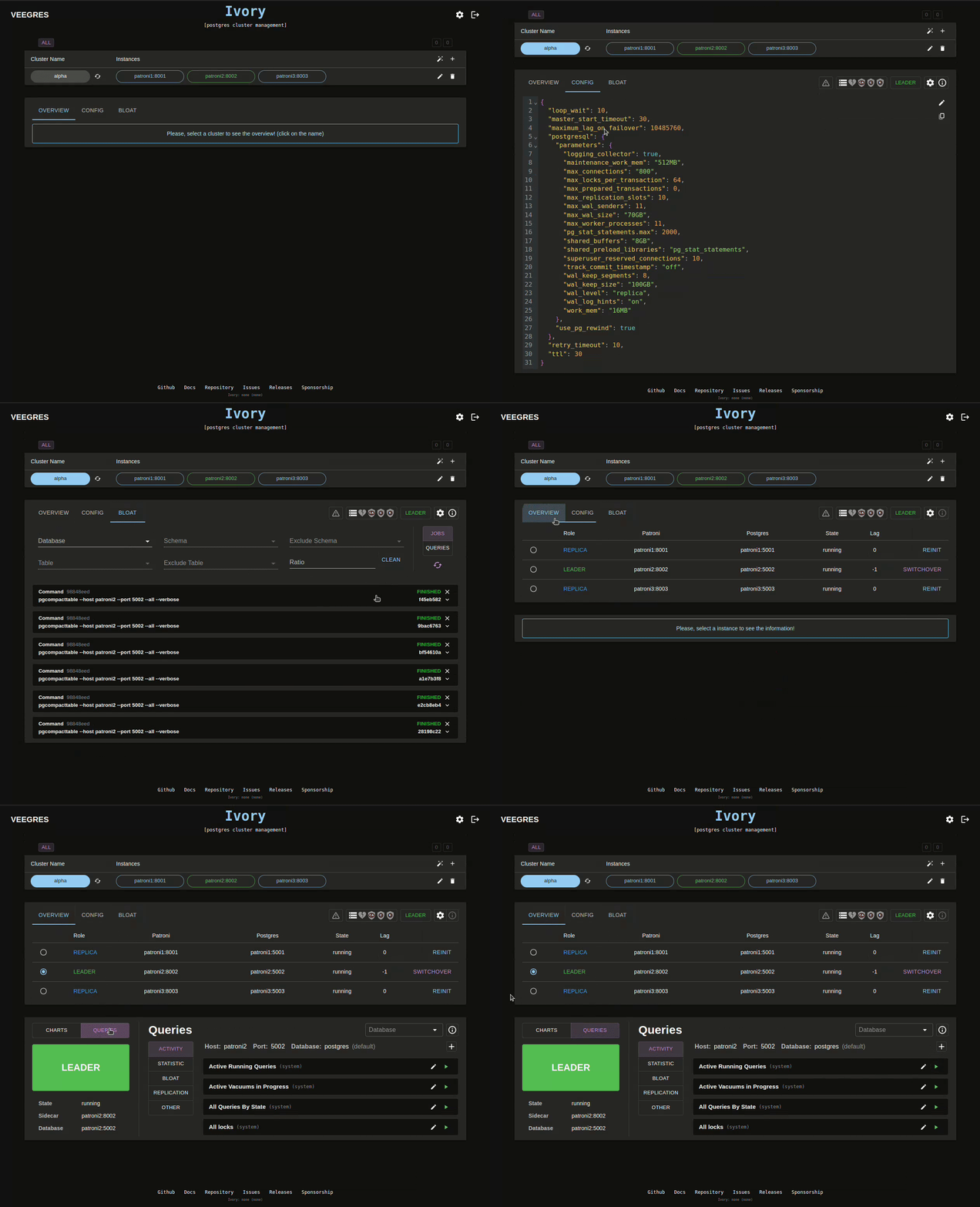
}https://github.com/veegres/ivory ←こういうUIがあるようです。